
Microsoft recently revised their security policy, mandating the utilization of the Microsoft Authenticator app as the primary Two-Factor Authentication (2FA) method. However, it’s important to note that if you are using a Huawei phone operating on HarmonyOS or 鸿蒙, attempting to install the Authenticator app will prove unsuccessful. Even if you manage to install it through alternative methods, the app will not function.
A viable solution is to modify the default sign-in method, opting for an alternative such as SMS (text).
To implement these adjustments, follow the outlined steps: –
1. Click on this link.
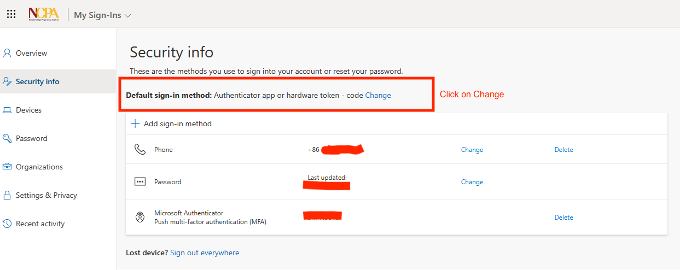
2. The Default sign-in method is “Authenticator app or hardware token.” Click on Change.
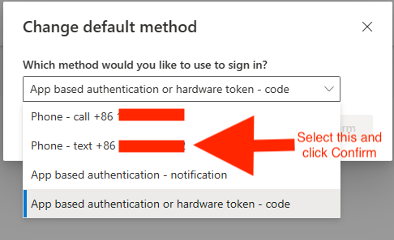
3. Select “Phone – text +86 (your phone number)” and then click Confirm.
4. You will now see that the Default sign-in method has changed.
