- Open “Settings” on iPadOS
打开iPadOS上的“设置“
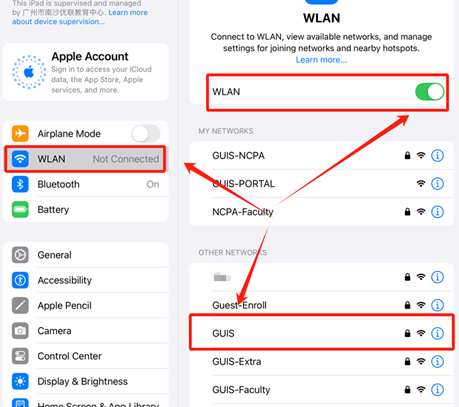
- In the “WLAN” settings, click “GUIS” in “OTHER NETWORKS”
在“WLAN”设置中,点击“其他网络”里面的“GUIS”
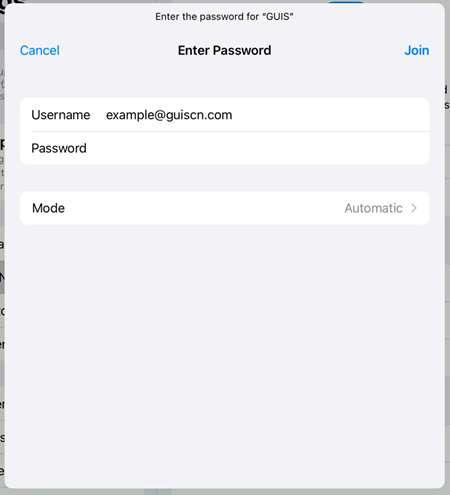
- iPadOS will prompt you for your WPA 2 Enterprise credentials. Enter your full GUIS/ NCPA/ ULC email address and password
iPadOS将提示您输入 WPA 2 Enterprise 凭证。输入您的完整 GUIS/NCPA/ULC 电子邮件地址和密码
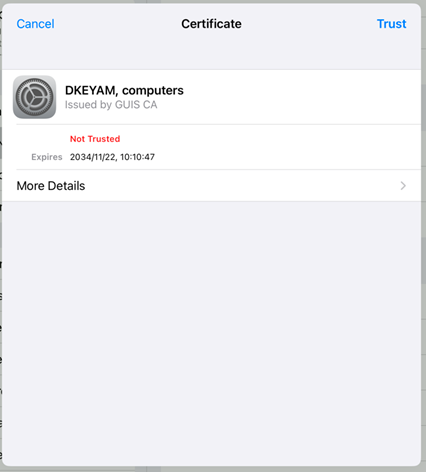
- iPadOS will prompt you for the server credentials. Click on the “More Detial” to verify the certificate fingerprint (See CERTIFICATE FINGERPRINTS). If everything is okay click “Trust”
iPadOS 将提供您当前的服务器凭据。单击“更多详情”以验证证书指纹(见证书指纹)。如果一切正常,请单击“信任”