1. Send your job to print by click Print button from File menu
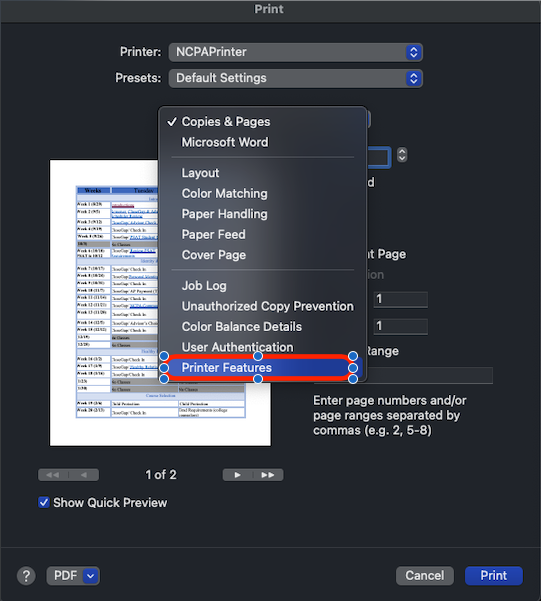
2. Find and select Printer Features from Copies & Pages drop down list
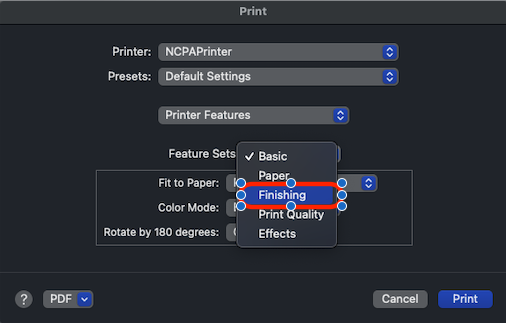
3. Select Finishing from Feature Sets
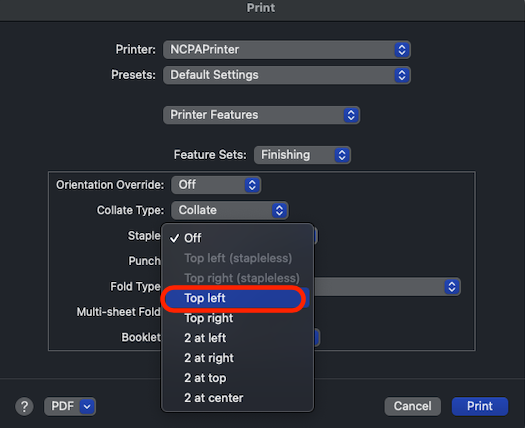
4. Select Top left from Staple

GUIS helpdesk | GUIS Information Technology Support Team | GUIS IT Department | Guangzhou Ulink International School
GUIS helpdesk | GUIS Information Technology Support Team | GUIS IT Department | Guangzhou Ulink International School
< 1 min read
1. Send your job to print by click Print button from File menu
2. Find and select Printer Features from Copies & Pages drop down list
3. Select Finishing from Feature Sets
4. Select Top left from Staple
The login method for limited content on this website has been changed to GUISCN.COM's NetID, please use the corresponding browser user profile
本网站受限内容的登录方式已更改为GUISCN.COM的网络身份认证,请使用对应的浏览器用户配置文件