
Purpose: This document explains how to access NCPA’s shared calendars.
Audience: Students
Instructions:
At a school of 600+ students, there are events that happen every day. If you want to know what’s going on around campus, you should make it a habit to check the school calendars at least weekly. There are two school calendars you should add to your school Outlook:
- School Calendar, containing all general school events such as sports competitions, music and drama performances, and AP testing date
- Day Rotation Calendar, which indicates whether a given day of the week is a Day 1, Day 2, or Day 0 (special day with all periods)
To add these calendars,
1. Visit your Outlook inbox in a web browser by visiting https://outlook.office.com
2. To add the School Calendar, search for an email from NCPA Account with the subject You’re invited to share this calendar which includes the message NCPA Account…would like to share an Outlook calendar with you called “School Calendar”. Click on the Accept button and the calendar will be opened in a new window and added to your account.
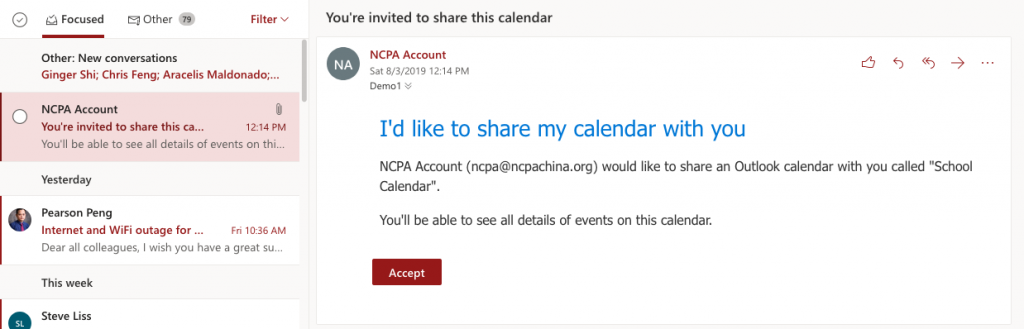
3. Repeat step 2 by finding the emails referencing the calendar Day Rotation Calendar.
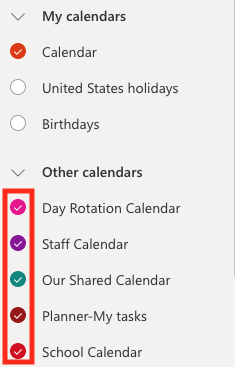
4. After completing steps 2 and 3, the calendars will also appear in your Outlook desktop and mobile apps.
5. You can toggle the calendars to show and hide in your Outlook by clicking the checkbox next to them in the left pane of your Outlook
Delete FAQ