
- If you already installed NCPA Software Center, skip step 1. If not, access https://itst.guiscn.com/kb/install-ncpa-software-center/ to download NCPA Software Center and install it.
- Launch the app NCPA Software Center
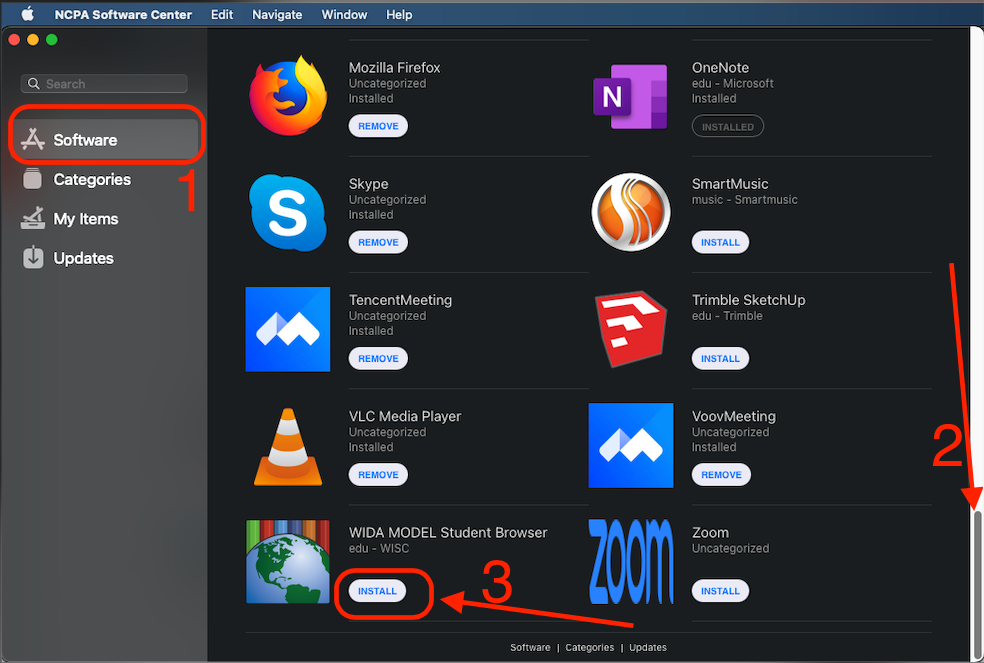
3. NCPA Software Center -> Software -> scroll down to the button to find the app icon -> click INSTALL near WIDA MODEL Student Browser, it will start download the app
4. Go to -> Updates, then click “UPDATE ALL” to finish the installation
5. Launch the app WIDA MODEL Student Browser
6. If still have trouble running the app, please visit IT Helpdesk (Work Hours – IT Staff; Study Hall – TST students)
7. Tips: To Quit the app please use keyboard combinations Option + Command + Esc