
Via “Networkmanager” method (Applied version 12 or above Debian-based OS)
Not tested by IT
IT 未对该方法进行测试
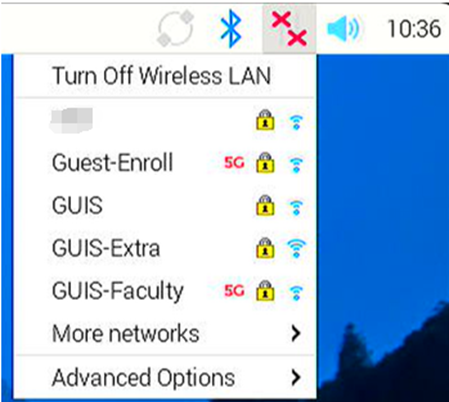
- Click on the Wi-Fi icon located in the upper right of your screen, select the network “GUIS” from the list of Wi-Fi networks
点击屏幕右上角的 Wi-Fi 图标,从 Wi-Fi 网络列表中选择网络“GUIS”
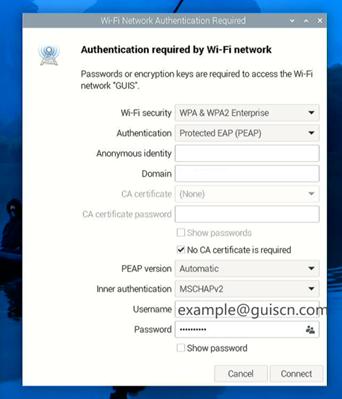
- Raspberry Pi OS will prompt you for your WPA 2 Enterprise credentials. Enter the information below
Raspberry Pi OS 将提示您输入 WPA 2 Enterprise 凭证。输入以下信息
| Wireless security | WPA & WPA2 Enterprise |
| Authentication | Protected EAP (PEAP) |
| Anonymous identity | (leave blank) |
| Domain | (leave blank) |
| No CA certificate is required | Clicked |
| PEAP version | Automatic |
| Inner Authentication | MSCHAPv2 |
| Username | Your full GUIS/ NCPA/ ULC email address |
| Password | Your GUIS/ NCPA/ ULC password |
Via editing “wpa_supplicant.conf” method (Applied version 11 Debian-based OS)
Tested by IT
IT 已对该方法进行测试
Edit the /etc/wpa_supplicant/wpa_supplicant.conf file using your preferred text editor
使用您喜欢的文本编辑器编辑 /etc/wpa_supplicant/wpa_supplicant.conf 文件
ctrl_interface=DIR=/var/run/wpa_supplicant GROUP=netdev
update_config=1
country=CN
network={
      ssid="GUIS"
      priority=1
      proto=WPA2
      key_mgmt=WPA-EAP
      pairwise=CCMP
      auth_alg=OPEN
      eap=PEAP
      identity="example@guiscn.com"
      password=hash:4e0f0cd4e19cf774d375ab0f59db8270
      phase1="peaplabel=0"
      phase2="auth=MSCHAPV2"
      }
The hash password is generated by following command
哈希密码通过以下命令生成
echo -n 'Enter_your_plaintext_password_here' | iconv -t utf16le | openssl md4Make the following commands automatically run under the wlan0 interface pre-up
使以下命令自动在wlan0的接口pre-up下运行
wpa_supplicant -B -Dwext -i wlan0 -c/etc/wpa_supplicant/wpa_supplicant.confRun the following command to see if you get the correct IP address
运行以下命令查看是否获取正确的 IP 地址
ifconfig wlan0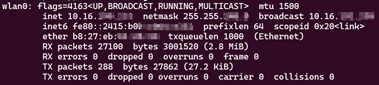
Ref Getting my Raspberry Pi on a PEAP-MSCHAPv2 wifi network | William Denton