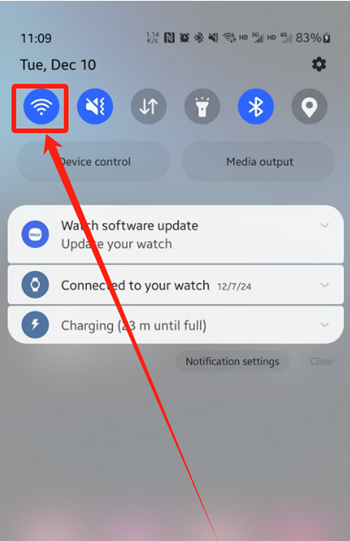
- Swipe down from the top of the screen, and press and hold the “Wi-Fi” button.
从屏幕顶部向下滑动,然后按住“Wi-Fi”按钮。
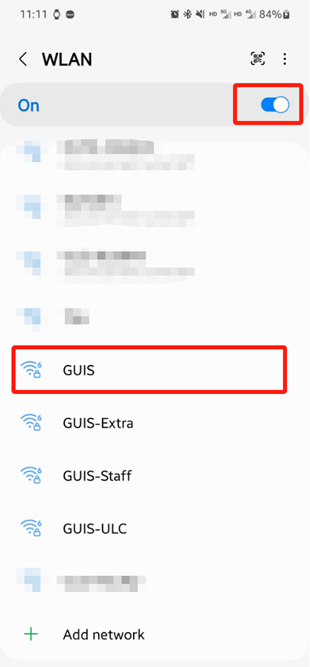
- In the Wi-Fi options, make sure it is switched to ON, then choose to connect to the “GUIS” network
在 Wi-Fi 选项中确保换到 ON状态,然后选择连接到”GUIS“网络
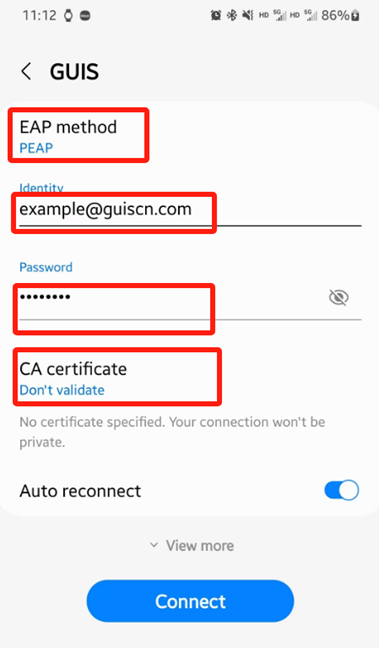
- One UI will prompt you for your WPA 2 Enterprise credentials. Enter the information below, then click “Connect”
One UI将提示您输入 WPA 2 Enterprise 凭证。输入以下信息,然后点击“连接”
| EAP method | PEAP |
| Identity | Your full GUIS/ NCPA/ ULC email address |
| Password | Your GUIS/ NCPA/ ULC password |
| Phase 2 authentication (If any) | MSCHAPV2 |
| CA certificate | Don’t validate |
| Anonymous identity | (BLANK) |
| Organization | The “Account Name” format you need to input |
| NCPA | [NetID]@ncpachina.org |
| ULC | [Network ID]@ulinkcollege.com |
| GUIS | [NetID]@guiscn.com |