
- Access link: https://portal.guiscn.com
访问链接:https://portal.guiscn.com
You can directly connect to the GUIS-PORTAL Wi-Fi to access the GUIS User Self-Service Portal without logging in.
你可以无需登录,直接连接到GUIS-PORTAL这个Wi-Fi去访问GUIS用户自助服务门户
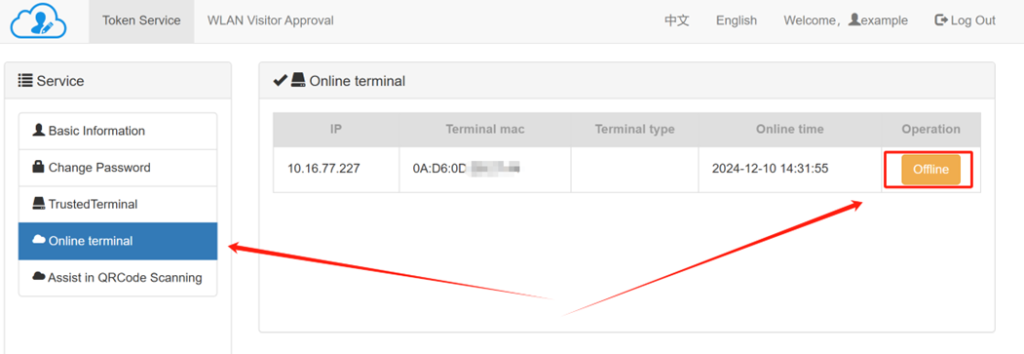
- The GUIS portal provides the following functions: password changing(not enabled yet) password reset (not enabled yet), query and self-service offline user terminals, WLAN visitor approval
GUIS 门户提供以下功能,修改密码(未启用),重置密码(未启用),查询和自助下线用户使用的终端,WLAN访客审批 - For self-service offline user terminals, please click the “Offline” button next to the corresponding terminal. This is useful if you accidentally connect more than one device.
对于自助离线用户终端,请点击相应终端旁边的“离线”按钮。如果您不小心连接了多个设备,此功能很有用。
Approval of long-term wifi users
对长期wifi访问者进行审批
Only authorized GUIS IT network manager and Sunglint network approver can use this feature.
只有授权的GUIS IT网络管理员和Sunglint网络审批者能使用此功能
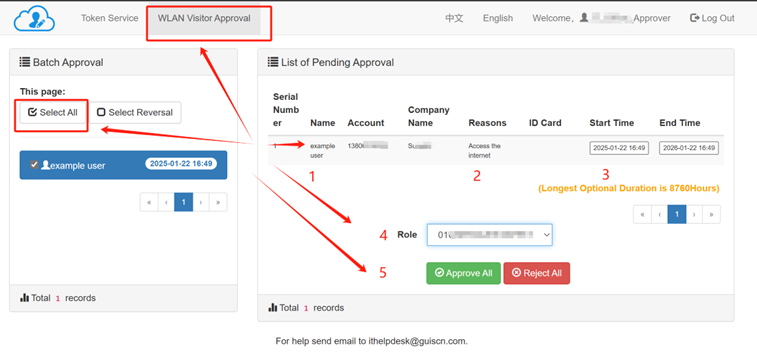
Locate the “WLAN Visitor Approval” tab and select the people you want to approve, and if needed, select All.
Verify the name and other information are correct, and then check the “Start Time” and “End Time” for the access period.
Assign the appropriate role and click Approve All
找到“WLAN 访客批准”选项卡,选择要批准的人员,如果需要,选择全部。
验证姓名和其他信息是否正确,然后检查访问期限的“开始时间”和“结束时间”。
分配适当的角色,然后单击全部批准