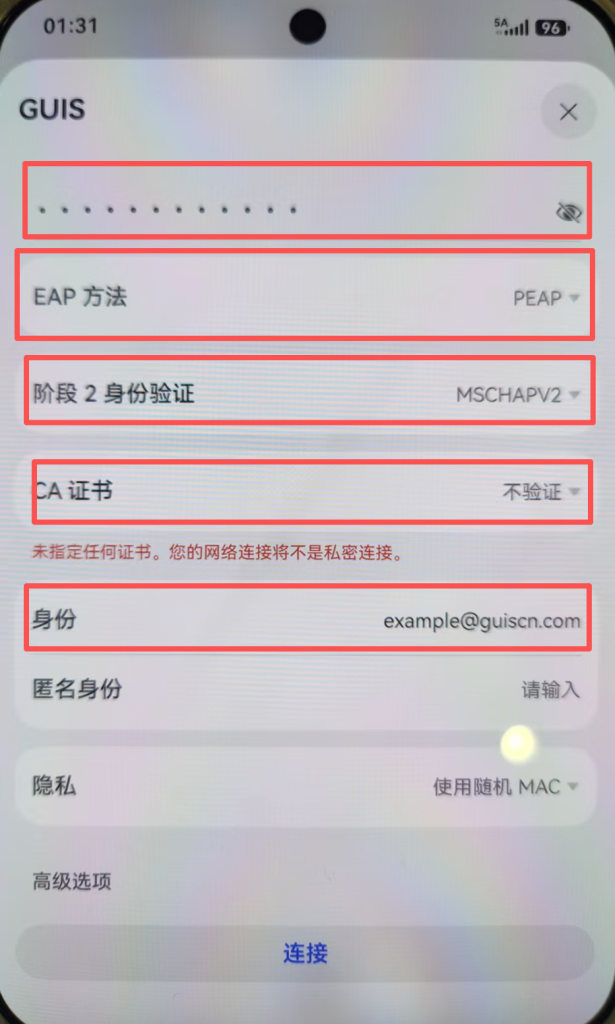
- In the “WLAN” settings, click “GUIS” in “OTHER WLAN”
在“WLAN”设置中,点击“其他WLAN”里面的“GUIS”
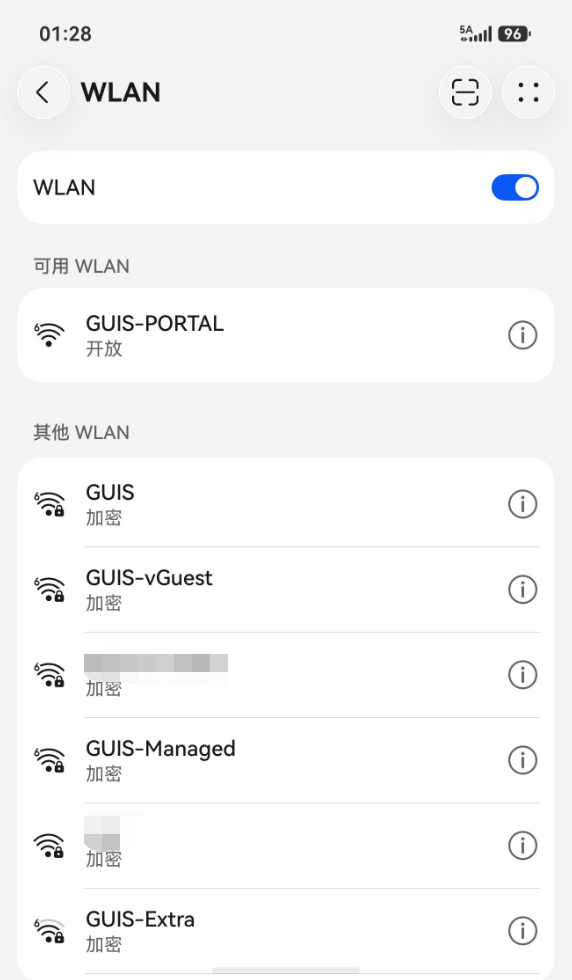
- HarmonyOS will prompt you for your WPA 2 Enterprise credentials. Enter the information below, then click “Connect”
HarmonyOS 将提示您输入 WPA 2 Enterprise 凭证。输入以下信息,然后点击“连接”
| EAP method | PEAP |
| Identity | Your full GUIS/ NCPA/ ULC email address |
| Password | Your GUIS/ NCPA/ ULC password |
| Phase 2 authentication (If any) | MSCHAPV2 |
| CA certificate | Don’t validate |
| Anonymous identity | (BLANK) |
| Organization | The “Account Name” format you need to input |
| NCPA | [NetID]@ncpachina.org |
| ULC | [Network ID]@ulinkcollege.com |
| GUIS | [NetID]@guiscn.com |